StrandVision Digital Signage
715-235-SIGN (7446) | www.StrandVision.com

- Home
- Service & Support
- Common Questions
Common Questions
Answers to High Level Questions
Everyone has questions about Digital Signage. This section answers many of the more common ones relating to Digital Signage Solutions offered by StrandVision Digital Signage. As always, if you don't find the answers here, give us a call at or email us at sales at StrandVision.com.Do you have a quick start guide?
Yes. We have several ways to help you get started. A quick start guide can be found here.
Why do you give away a free digital signage subscription?
By using the free digital signage software trial subscription, you get to take advantage of the StrandVision Digital Signage video messaging system without paying a thing. We are confident that once you see how much it improves your business marketing communications, you will feel comfortable subscribing and continue to use it - and getting even more capabilities in the process.
How much does it cost?
There are several service packages available. We show our recommendations of the services you can use along with the prices on our digital signage pricing page.
How can I get information from my web site on my Digital Media Player?
There are many ways to do that. You can use in-house technical staff, an outside developer, or you can turn to StrandVision. StrandVision can do custom development to gather information from your copyright-cleared web site.
Do you have a reseller program?
Yes, we do have a reseller program. We call our resellers "installers."
To find an installer to help you with your installation, click here. To find out about becoming a StrandVision reseller/installer, click here.
Why is the stock information unavailable?
Stock information is an optional service. Contact StrandVision to activate that portion of your account.
Why is a flash player setting window appearing over my digital signage?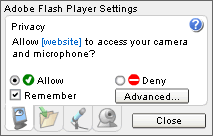
Certain signage pages such as the local streaming video page type need access to your camera or microphone. When you see the box similar to that shown to the right, click on the "Allow" and "Remember" checkboxes and click close. That allows playback of your television or camera video from that point forward with no additional interaction.
How do I purchase from you?
Sorry - We don't make it obvious how to pay us money... We offer the free digital signage software test drive to be sure that you have experienced the product and are ready to build your business using digital signage. Here are the steps to guide you into purchasing.